Key Highlights
- How customer data analytics pinpoints exactly what your customers want
- Simple tools to track and interpret customer behavior, without technical skills
- Ways to target high-value prospects and cut wasted marketing spend
- How to personalize campaigns automatically for better conversions
- Steps to uncover hidden revenue streams and new growth opportunities
- A proven 6-step system to turn raw data into measurable results
Really great marketing starts with understanding your customers. And if you don't have a good grasp of who they are, you'll end up wasting time, money, and potential. That's exactly why customer data analytics is super important. Companies that use customer data effectively are 2.6 times more likely to outperform competitors and 23 times more likely to acquire customers.
It turns everyday interactions into a roadmap by figuring out what people want and how you can deliver it to them.
Businesses that really make the most of analytics often see 93% higher profits and 115% ROI.
Using customer data and analytics doesn't have to make things complicated. You can find your ideal customers and speak to them personally.
What is Customer Data Analytics?
Right now, your website is collecting a goldmine of data about every visitor—but most business owners are throwing this valuable intelligence away.
Every customer interaction reveals:
- What they're really looking for (search terms, page visits)
- How close they are to buying (time spent, pages viewed)
- What's stopping them from converting (where they exit your site)
- Which marketing actually works (referral sources that convert)
- When they're ready to buy again (purchase patterns)
The bottom line: This isn't just data—it's a roadmap to predictable revenue growth.
But you need to stop treating every lead the same; they aren't. With the use of customer analytics, you can personalize what you say and when you say it, based on what people do, not just who they are.
For example:
- Target visitors who viewed your pricing page with a special offer
- Send different emails to customers who bought once vs. repeat buyers
- Focus ad spend on traffic sources that actually convert
- Fix the exact pages where potential customers are leaving
Think of it this way: You're getting a GPS for your revenue—showing you exactly where money is leaking and the fastest route to plug those holes.
And don't worry, you don't need to become a data scientist. The fastest-growing SMEs for collecting data and doing the heavy lifting for you:
- Google Analytics (free and powerful)
- HubSpot (all-in-one marketing + data)
- Tableau (turns data into clear visuals)
Most of these can be set up in less than an hour. You'll start seeing results before the month's up.
Importance of Customer Analytics
Customer analytics data reduces guesswork and allows you to make informed decisions. Without it, you rely on assumptions, but with it, you understand what actually influences your customer and revenue.
Customer Analytics Works
1. Data collection:
- Customer analytics starts with collecting data from all of your customer touchpoints, including your website, CRM, email campaigns, and paid ads. This gives you a full view of how people interact with your business.
2. Data integration and organization:
- Data can't stay scattered; it needs to be organized. This ensures that your data is accurate, consistent, and easy to read. This means that you'll have a single view of each customer, and it makes it easier to track behavior across different channels.
3. Analysis and insights:
- Here, you look for patterns and trends that explain how your customers behave. You can identify which channels receive the most conversions, where users drop off, and what actions lead to sales.
4. Segmentation and targeting:
- Now, you can segment your audience into specific groups based on behavior, interests, or value. Instead of sending the same message to everything, you can send more relevant content and offers that match what each group is searching for. Segmented campaigns can drive up to 760% increase in email revenue.
5. Testing and optimization:
- You can now adjust your messaging, refine your ad targeting, and improve your landing pages. This makes your marketing more effective and increases your chances of conversions.
6. Measurement and reporting:
- By tracking performance, you can see what is working and what needs improvement. This creates a feedback loop.
Types of Customer Data Analytics
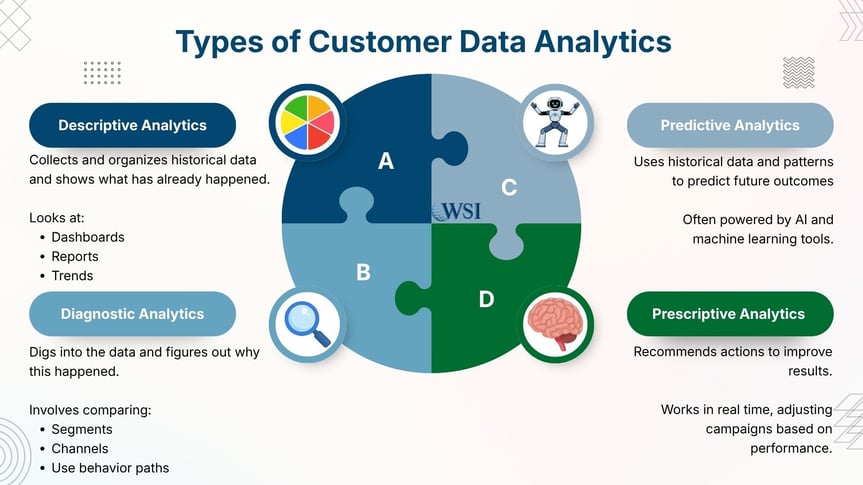
Descriptive Analytics (What Happened?)
Descriptive analytics looks at what has already happened. It collects and organizes historical data, allowing you to see your performance clearly. You're looking at dashboards, reports, and trends over time. With this, you can spot patterns (like seasonal spikes or high-performing campaigns).
Diagnostic Analytics (Why Did it Happen?)
Once you know what happened, the next step is understanding why. Diagnostic analytics dig deeper into the data to figure out the causes and relationships. This often involves comparing segments, channels, or user behavior paths.
Predictive Analytics (What Will Happen?)
This type uses historical data and patterns to forecast future outcomes, helping you move from reactive to proactive marketing. This is often powered by AI and machine learning tools.
Prescriptive Analytics (What Should You Do?)
Prescriptive analytics is the most advanced stage. It not only predicts outcomes, but also recommends actions to improve results. It works in real time, adjusting campaigns based on performance. With this, you can make faster and smarter decisions.
Types of Customer Data (Source)
Zero-Party Data
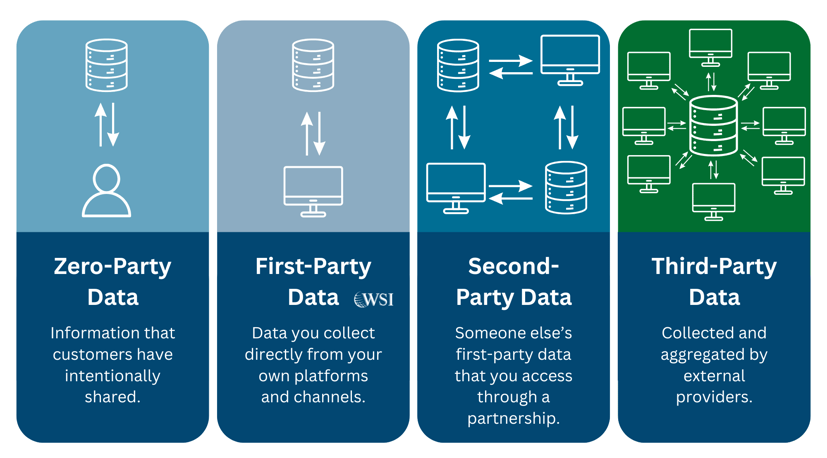
Zero-party data is information that your customers intentionally share with you. This is not inferred or tracked in the background, and it comes directly from the customer. This makes it one of the most reliable forms of data you can use.
Examples include survey responses, quiz results, preference selections, and account settings. As privacy regulations become stricter, zero-party data is becoming more important, as it allows you to build trust with your audience while still gathering meaningful insights.
First-Party Data
First-party data is the information you collect directly from your own platforms and channels (including your website, CRM systems, email campaigns, and any other owned digital assets).
Examples include website visits, page views, purchase history, email engagement, and customer integrations.
You own and control this data, making it the most valuable data source for your business.
Second-Party Data
Second-party data is someone else's first-party data that you access through a direct partnership. This typically involves collaborating with another business that shares a similar audience.
An example includes partnering with a complementary company. You may be able to access anonymized customer insights, campaign performance data, or audience segments that they have already built.
This type of data is usually more reliable than third-party data because it comes from a known and trusted source.
However, this requires clear agreements and strong data governance. Both parties need to handle data responsibly and comply with privacy regulations.
Third-Party Data
Third-party data is collected and aggregated by external providers who do not have a direct relationship with your customers. This data is often gathered from multiple sources and sold to businesses for targeting and analysis.
Examples include demographic data, interest categories, and audience segments provided by advertising platforms or data vendors.
Its reliability and availability are declining due to increasing privacy regulations and the phase-out of third-party cookies.
Types of Customer Data (Structure)
Quantitative
Quantitative data is numerical and measurable. It tells you what is happening in your business using clear metrics and statistics.
Examples include website traffic, conversion rates, click-through rates, revenue, customer acquisition cost, and lifetime value.
Qualitative
Qualitative data focuses on understanding customers' thoughts, opinions, and experiences. It provides context and meaning behind the numbers.
Examples include customer feedback, reviews, survey comments, support conversations, and user interviews.
5 Ways Data Analytics Grows Your Business
Stop wondering if your marketing is working. Here's exactly how data analytics turns uncertainty into growth:
1. Stop Guessing, Start Knowing What Customers Actually Want
As a business owner, you want to know who you are selling to. Who are your customers? We’re not just talking about market segments or marketing personas. We mean individuals. Your visitors behave differently—and that behavior tells you exactly what to improve, promote, or fix to win more sales. They arrive at your site via different routes and with a variety of questions that they want answered.
For example, one of our clients discovered that 60% of their leads came from mobile users searching "emergency repair" after 6 PM. They adjusted their ads and saw a 40% conversion increase in 30 days.
Your takeaway: When you know the specific problems customers are trying to solve, you can be the exact solution they're looking for.
2. Target High-Value Prospects (Not Time-Wasters)
Stop spending marketing dollars on people who'll never buy. Data shows you exactly who converts and who doesn't.
With data analytics, you can create market segments based on hard data. Move beyond generic personas. Segment based on real-time behavior to trigger campaigns that convert. You can then tailor your content marketing or social media marketing appropriately.
What this looks like: Instead of blasting emails to everyone, you'll send different messages to:
- First-time visitors (education-focused)
- Repeat visitors (conversion-focused)
- Past customers (upsell opportunities)
Bottom line: Your marketing budget works harder because every dollar targets someone likely to buy.
3. Automate Personalization
Data-driven segmentation leads naturally to personalization: As you gather data on each customer, your segmentation becomes so refined that you have enough data to personalize your approach to each and every customer.
The best part? Once set up, the system runs itself. AI tools automatically send the right message to the right person at the right time.
For example, when someone downloads your pricing guide but doesn't buy within a week, they automatically get a case study showing ROI. When they visit your pricing page twice, they get a limited-time discount.
Your takeaway: Personalized marketing that scales without adding work to your day. You can let the analytics and AI tools do the work for you.
4. Cut Marketing Waste and Increase ROI
Stop throwing money at campaigns that don't work. Data shows you exactly which marketing channels deliver customers and which ones drain your budget.
You can eliminate speculative spending and put your marketing money only into leads and prospects that are most likely to convert. With the help of AI tools like CallTrackingMetrics, HubSpot, or Tableau, you can customize each campaign to reach individual customers.
Translation: If you spend $5,000/month on marketing, you could get the same results for $2,500—or double your results with the same budget.
5. Discover Hidden Revenue Streams You're Missing
Data reveals money-making opportunities hiding in plain sight. Some common discoveries include things like:
- Customers who buy Product A also want Product B (cross-sell opportunity)
- Clients from specific industries have 3x higher lifetime value (focus your sales efforts)
- 20% of customers are about to cancel (save them with targeted offers)
For example, one business discovered that customers who attended their webinar spent 40% more. They doubled their webinar frequency and increased revenue by $200K annually.
Want to See What Your Data is Really Telling You?
We’ll review your current setup and show you:
- Where customers drop off
- Which channels drive real revenue
- Quick fixes you can implement immediately
Book a free data review with a WSI consultant
6 Steps to Get Real Results From Your Data
The truth is, having data doesn't automatically grow your business. Most companies drown in spreadsheets but starve for insights.
Here is a step-by-step roadmap to help you:
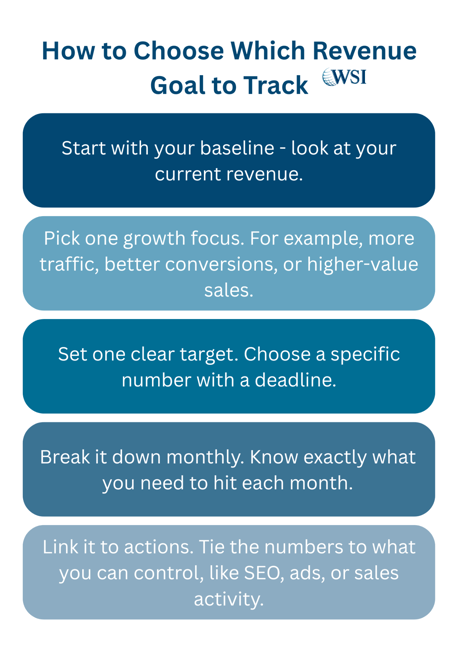
Step 1: Pick ONE Revenue Goal
Before touching any data, answer this: What's the single biggest growth bottleneck in your business right now? Choose one:
- Increase website conversion rate by 25%
- Reduce customer acquisition cost by 30%
- Boost repeat purchase rate by 40%
Why one goal? When you focus on everything, you achieve nothing. Pick your biggest revenue leak first—fix it, then move to the next. Get very specific about where you want your data to take you.
Step 2: Connect Your Data Sources
Right now, your customer data is scattered across different platforms—and that's costing you insights. For quick wins, connect these three first:
- Website analytics (Google Analytics)
- Email platform (Mailchimp, Constant Contact)
- Sales system (CRM like HubSpot or Salesforce)
Pro tip: Tools like HubSpot do this automatically. No technical skills required—most setups take under 2 hours.
By consolidating your data into a single, centralized platform, you'll organize that constantly growing mass of data, avoid any gaps, and identify trends.
Step 3: Track What Matters
Stop getting distracted by impressive-sounding numbers that don't affect your bottom line. The amount of data you have is not the point. Not every fact or stat is relevant, and there is always a high risk of duplication.
Track these revenue drivers:
- Cost per lead (not total website traffic)
- Conversion rate by traffic source (not social media likes)
- Customer lifetime value (not email open rates)
Reality check: 10,000 website visitors who don't buy anything is worse than 100 visitors who convert at 10%.
It is always the quality of your data that counts. Messy data costs you. Clean it. Sort it. Align it with your revenue goals—or risk wasting your spend.
Step 4: Start With Free Tools
Don't break the bank on expensive software you don't understand yet. If you're starting from scratch, then start here:
- Google Analytics (free) - Track website behavior
- Google Search Console (free) - See how people find you
- Your existing CRM - Most have basic analytics built-in
Upgrade when: You're consistently using free tools and need more advanced features. Not before.
Step 5: Share Insights That Drive Action
Data sitting in spreadsheets doesn't grow your business. People acting on insights do. Data-driven insights should be a part of every decision across the board, from sales to operations. Something you can start trying for your weekly updates:
- Share 3 key insights with your team (not 30 metrics)
- Focus on what they should DO differently
- Track if changes actually improve results
For example: "Instagram ads convert 40% better than Facebook. Let's move 50% of our ad budget there this month."
Step 6: Review and Improve Monthly
Checking data every day creates noise, not insights. Data analytics should be an ongoing project; you will need to monitor customer behavior constantly, continue doing what works, eliminate what doesn't, and update whatever has become outdated.
Set a monthly rhythm for real improvements.
- What worked better than expected? (Do more of this)
- What disappointed? (Fix or eliminate)
- What new opportunities appeared? (Test next month)
Time investment: 2 hours per month beats 15 minutes every day. Focus beats frequency.
Privacy You Can Trust
Whenever a business gathers data about its customers, the biggest concern is likely to be privacy. You will need to ensure you can collect large amounts of information about your customers’ behavior while still protecting their privacy. Some of the things you will need to do to address these privacy concerns are:
- Be Crystal Clear About What You're Collecting: Add a simple privacy notice to your website: "We use cookies to understand how you use our site and improve your experience." Most customers are fine with this—they just want to know what's happening.
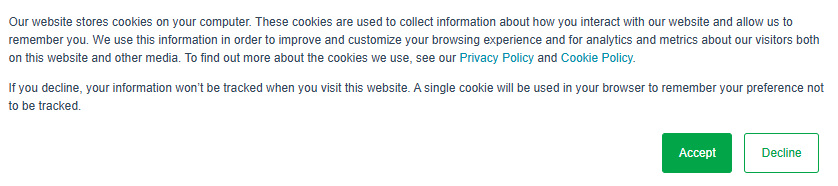
- Get Permission the Easy Way: Utilize tools like CookieYes or Cookiebot to automatically handle consent. One-time setup, ongoing compliance.
- Get Familiar with Your Relevant Legal Frameworks: These include the General Data Protection Regulation (GDPR) in the EU, the Personal Information Protection and Electronic Documents Act (PIPEDA) in Canada, and the California Consumer Privacy Act (CCPA) in California.
- Use Built-In Privacy Protection: Tools like Google Analytics automatically anonymize visitor data. Choose platforms that handle privacy for you.
- Simple Monthly Check: Ask yourself, "Are we collecting only data we actually use?" Delete anything unused for 6+ months.
71% of consumers expect companies to deliver personalized interactions, but 76% are concerned about data privacy.
What If I Mess Up Privacy Compliance?
The reality is that most privacy issues come from major data breaches, not small businesses collecting basic customer insights. Your biggest risks:
- Storing unnecessary personal information
- Not securing customer data properly
- Ignoring customer requests to delete their data
Simple protection: Use reputable tools (Google, HubSpot, etc.) that handle security for you. They have bigger legal teams than you need.
4 Essential Tools That Actually Work for Small Businesses
Stop Googling "best analytics tools", here's what actually works for businesses like yours. We've tested dozens of platforms with our clients. These four work, without breaking your budget or requiring a computer science degree:
Recommended Tool 1: Google Analytics 4 (Free)
Google Analytics is best for understanding what's actually happening on your website
Why start here: It's free, powerful, and shows you exactly where visitors come from and what they do on your site.
What you'll discover:
- Which marketing channels bring customers (not just traffic)
- Pages where people leave your site (fix these first)
- Peak times when your audience is most active
Setup time: 30 minutes | Learning curve: Moderate
Bottom line: If you install only one tool, make it this one.
Recommended Tool 2: HubSpot CRM (Free tier available)
HubSpot CRM is best for businesses ready to get serious about growth.
Why we recommend it: Everything connects automatically—website, email, sales, and customer data in one place.
Real client example: One client discovered their blog readers were 3x more likely to buy than social media followers. They shifted focus and increased revenue by 45% in 6 months.
Setup time: 2 hours | Learning curve: Easy
Only upgrade when you need advanced automation features.
Recommended Tool 3: Tableau (Paid)
Tableau is a paid tool best for businesses with complex data that need clear visual insights.
This tool turns confusing spreadsheets into clear charts you can actually understand and act on.
Client success story: Communications and media giant Verizon used Tableau to enhance its customer service department, reducing call volumes by 43% and technical dispatches by 62%
Setup time: 4 hours | Learning curve: Moderate
This is best for businesses with $500K+ annual revenue.
Recommended Tool 4: Mixpanel (Free tier available)
Mixpanel is best for eCommerce and SaaS businesses tracking customer journeys.
This tool shows exactly where potential customers drop off in your sales process.
Setup time: 3 hours | Learning curve: Moderate
Consider this if you have an online store or app.
Which Tool Should You Start With?
- If you're just getting started: Google Analytics 4 (free)
- If you want everything connected: HubSpot (free tier)
- If you need better visuals: Tableau (when you're ready to invest)
- If you sell online: Mixpanel (when you're ready to invest)
Pro tip: Start with one tool, master it for 90 days, then add the next one. Tool overwhelm kills more data projects than technical problems do.
Where Does Your Business Stand? Take Our Free 5-Minute Assessment
Want your data to drive real growth? Start by knowing where you stand—and what’s missing. Before investing in new tools or strategies, find out exactly where your business stands today.
Most business owners think they're further behind than they actually are. This quick assessment shows your current data maturity level and the exact next steps to grow your revenue.
Take 5 minutes to review where you are in the process:
Level 1: Getting Started (Most Small Businesses)
- You have Google Analytics installed
- You track basic metrics like website traffic
- You know which marketing channels bring visitors
- You make decisions based on monthly reports
If this sounds like you: You're already ahead of 40% of small businesses. Next step: Connect your website data to your sales data.
Level 2: Making Progress (Growth-Focused Businesses)
- You track conversion rates, not just traffic
- You know your customer acquisition cost
- You can see which marketing channels actually bring customers
- You make weekly adjustments based on data
If this sounds like you: You're in the top 25% of SMBs. Next step: Automate your reporting and add predictive insights.
Level 3: Data-Driven (High-Performing Businesses)
- You predict customer behavior before it happens
- Your marketing adjusts automatically based on performance
- You know the lifetime value of different customer segments
- Data insights drive every major business decision
If this sounds like you: You're in the top 10%. Next step: Advanced AI integration and market expansion strategies.
Level 4: Optimized (Market Leaders)
- AI handles routine optimization automatically
- You can predict market trends before competitors
- Customer experience personalizes in real-time
- Data insights create new revenue streams
If this sounds like you: You're likely already dominating your market. Next step: Focus on scaling these advantages.
What's Your Next Move?
- Level 1 → Level 2: Focus on connecting your website analytics to actual sales. Start with HubSpot's free CRM or upgrade your existing system.
- Level 2 → Level 3: Implement automated reporting and begin testing AI-powered insights. This usually takes 3-6 months with the right partner.
- Level 3 → Level 4: Advanced predictive analytics and market expansion strategies. Consider a comprehensive data strategy overhaul.
Perform Your Customer Data Analysis Today
Feeling overwhelmed? Most business owners do. That's exactly why WSI exists—to take you from wherever you are today to the next level, without the technical headaches.
Schedule a free consultation with one of our WSI Consultants. Our marketing experts and AI consultants will audit your systems, recommend tools specific to your business, and map a road to measurable growth.