
What You’ll Learn
- What content decay is and why it happens
- How to recognize declining content before traffic drops further
- Which SEO and engagement metrics to monitor
- How to separate content decay from seasonal or technical issues
- Which pages you should refresh first
- How to update content for current search intent
- Which tools can help you monitor content performance
- How to measure whether a content refresh worked
Editor's Note: This post was originally published in March 2025 and has been updated with new content in August 2026.
Content is a vital component of a successful digital marketing strategy.
However, even the best-performing content can experience a decline in traffic, engagement, and rankings over time. This phenomenon, known as content decay, can significantly impact your search engine visibility and overall marketing effectiveness. By understanding content decay and implementing strategic updates, businesses can maintain their content's relevance, improve search rankings, and drive consistent organic traffic.
Understanding Content Decay and Its Impact on Organic Traffic
As search engine algorithms evolve and new content enters the digital landscape, older content can lose its ability to attract visitors and rank well. This decline in performance, or content decay, occurs when a webpage's relevance and authority diminish over time. Left unchecked, content decay can lead to decreased organic traffic, lower search rankings, and reduced engagement.
As Neil Patel says, updating content actually takes less work and delivers faster results, which can only benefit your overall content marketing strategy. However, understanding why content decay happens and how it impacts your website's visibility is essential for developing an effective content refresh strategy.
Content decay usually happens gradually. A slow decline over several months is more likely to indicate decay than a sudden drop caused by a technical problem, algorithm update, website migration, or tracking issue.
What Causes Content Decay?
Content decay happens when a page gradually loses organic traffic, rankings, engagement, or conversions after previously performing well.
Common causes include:
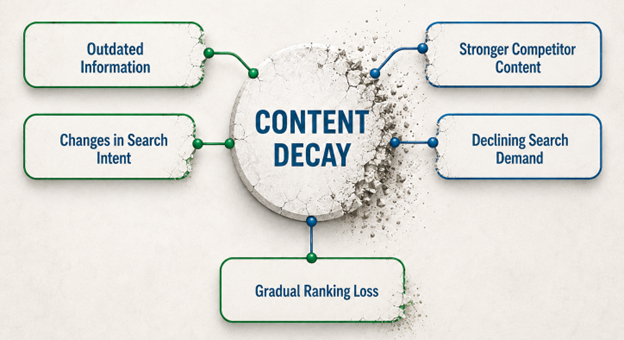
Outdated Information
Statistics, examples, product details, pricing, regulations, or recommendations can become inaccurate over time. This makes the content less useful to readers and search engines
Changes in Search Intent
What people want from a search can change. Google has reported that 15% of the searches it sees each day are entirely new, showing how frequently search behavior and information needs continue to change.
Stronger Competitor Content
Competitors may publish newer or more useful pages. Better examples, clearer explanations, stronger expertise, and fresher research can push older content down the rankings.
Declining Search Demand
Some topics naturally lose popularity. Seasonality, new technology, industry changes, and changing customer behavior can all reduce search volume.
Gradual Ranking Loss
A small drop in rankings can have a large effect on traffic. Moving from position 2 to position 6, for example, can significantly reduce the number of clicks. Ranking declines can have a substantial impact on traffic. In Backlinko’s analysis of roughly four million Google search results, the top three organic results received 54.4% of clicks, while the number-one result had an average CTR of 27.6%.
When Does Content Start Decaying?
Content can begin to decay within a few months of publication, but there is no fixed timeline. The rate depends on the topic, competition, search behavior, and how often the information changes.
Fast-Moving Topics
Content about technology, AI, software, regulations, pricing, or industry news may start losing relevance within weeks or months. These pages often need frequent reviews.
Competitive Search Topics
Pages targeting competitive keywords can decline sooner as competitors publish new content, improve existing pages, and respond to changes in search intent.
Evergreen Content
Evergreen content can perform well for years, but it still needs regular monitoring. Statistics, examples, links, and recommendations can become outdated even when the core topic remains relevant.
Seasonal Content
Seasonal pages may show sharp declines in traffic outside their peak period. This is not always true content decay, so compare performance year over year before making major changes.
Signs That Decay Has Started
Watch for steady declines in organic impressions, clicks, keyword rankings, engagement, and conversions. Comparing performance over 3, 6, and 12 months can help you identify whether a page is experiencing a temporary dip or a longer-term decline.
A traffic decline does not always mean content is decaying. Seasonal demand can produce predictable peaks and declines. Compare year-over-year performance, search demand, rankings, and conversions before deciding that a page needs a major update.
Why Content Decay Matters for SEO
As we mentioned, content decay refers to the gradual decline in a webpage's performance over time. This decline typically manifests as lower search rankings, reduced traffic, and decreased user engagement. Several factors contribute to content decay, including outdated information, increased competition, and changes in search intent. If left unaddressed, content decay can weaken your website's authority and reduce your visibility on search engine results pages (SERPs).
Search Engine Rankings
Content that is not regularly updated may slip down the SERPs, making it harder for users to find. Search engines prioritise fresh, relevant content that aligns with current user queries. If competitors publish more up-to-date and comprehensive content, they may outrank older pages, leading to a drop in organic traffic.
User Experience and Engagement
Outdated or irrelevant content can also negatively impact the user experience. If visitors land on a page only to find information that no longer applies, they will likely leave quickly, increasing the bounce rate. For instance, if an article still discusses pandemic lockdowns in the present tense, users will question the credibility and freshness of the content, reducing trust in the website.
Search Intent and Click-Through Rates (CTR)
Search intent evolves over time. According to Ahrefs, search intent shifts happen because words change meaning over time, and Google needs to reflect this change; otherwise, it can't fulfill its mission to provide the best search results for its users. Content that previously aligned with user searches may no longer meet their expectations. As a result, click-through rates may decrease, reducing overall traffic to the page. Keeping content aligned with evolving search intent ensures it continues to attract and engage visitors.
Algorithm Updates and Competitive Shifts
Google and other search engines frequently update their algorithms to provide the most relevant results to users. According to SearchEngineLand, Google launched 4,725 changes to its search, including changes to its ranking systems, user interface, and more, in 2022. That means Google Search changed 13 times per day, on average, that year. These updates often reward high-quality, fresh content, while outdated content may lose rankings. Additionally, as competitors create new and improved content, they may push older pages further down the SERPs.
Identifying Your Best-Performing Content
It's also true that not all content contributes equally to your website's success. Some pages generate steady traffic, engagement, and conversions, while others struggle to gain traction. Identifying your best-performing content allows you to focus on high-impact updates, ensuring that your most valuable pages continue to drive results. By analysing key performance metrics, you can determine which content deserves a refresh and which may need a complete overhaul.
Tracking Key Performance Metrics
Content performance changes over time. Search algorithms change, competitors publish new content, and customer needs evolve.
Regular performance reviews help you identify:
-
Pages that continue to attract traffic and engagement
-
Pages that are losing visibility
-
Content that needs updating or expanding
-
Opportunities to improve search rankings and conversions
Focus on the following metrics when reviewing your content.
Organic Traffic
Organic traffic measures how many visitors reach a page through search engines.
What to look for
-
Stable or growing traffic usually indicates that the page remains useful and visible in search results.
-
Declining traffic may indicate falling rankings, increased competition, or changing search behavior.
What to do
Compare traffic over several months rather than reacting to short-term changes. If traffic continues to fall, review the page for outdated information, missing topics, and SEO improvements.
Engagement
Engagement metrics show how visitors interact with your content.
Useful metrics include:
- Time on page
- Scroll depth
- Link clicks
- Video plays
- Other page interactions
Low engagement can indicate that visitors are not finding the information they expected. The content may also be difficult to read, too shallow, or outdated.
Review the page structure, search intent, content quality, and calls to action when engagement declines.
Click-Through Rate
Click-through rate, or CTR, measures the percentage of people who click your page after seeing it in search results.
A strong CTR suggests that your search listing matches what users are looking for.
A low CTR can indicate problems with:
- Page titles
- Meta descriptions
- Search intent
- How your result appears compared with competing pages
Test clearer titles and descriptions that accurately explain what users will find on the page. Relevant structured data may also help search engines understand and display your content more effectively.
Keyword Rankings
Keyword rankings show where your pages appear in search results for important search terms.
Falling rankings can indicate that competitors have published stronger or more current content.
When rankings decline, review:
- Content accuracy
- Topic coverage
- Search intent
- Page structure
- Internal links
- Competing search results
Updating useful pages can help maintain or regain search visibility.
Search Impressions
Impressions measure how often your page appears in search results.
Look at impressions together with CTR.
High impressions and low CTR
Your page is appearing in search, but users are choosing other results. Review the title, description, and relevance to the search query.
Falling impressions
Your page may be appearing for fewer searches. This can happen when rankings fall, search demand changes, or search engines consider competing content more relevant.
Bounce Rate
Bounce rate can help you understand whether visitors continue interacting with your website after reaching a page.
A high bounce rate does not automatically mean a page is performing poorly. Some visitors may find the information they need without visiting another page.
However, a high bounce rate combined with low engagement or poor conversions can indicate a problem.
Check whether the page:
- Answers the visitor's question clearly
- Loads quickly
- Is easy to read
- Provides useful next steps
- Includes an appropriate call to action
Backlinks
Backlinks are links to your content from other websites.
Relevant links from trusted websites can help demonstrate that your content is useful and credible.
Track both the number and quality of backlinks over time.
A loss of valuable backlinks may indicate that:
- Your content has become outdated
- Other websites have published better resources
- Pages linking to your content have changed or disappeared
Updating strong existing content can give other websites a reason to continue referencing it.
Review Performance Regularly
No single metric tells the full story.
Review organic traffic, engagement, CTR, rankings, impressions, bounce rate, and backlinks together. This gives you a clearer picture of how each page is performing.
Use those findings to decide whether a page should be:
- Updated
- Expanded
- Re-optimized
- Combined with another page
- Redirected
- Left unchanged
Regular content reviews help you protect strong-performing pages while identifying content that needs attention. This supports ongoing search visibility, better user experiences, and stronger website performance.
Backlinks from reputable sources can significantly boost a page's search rankings. In contrast, a loss of backlinks over time might signal that the content is becoming less relevant or authoritative in its industry.
By regularly tracking these performance metrics, businesses can determine which pages continue to generate value and which require optimization to remain competitive in search results.
Don’t diagnose content decay using one metric alone. A sustained decline in traffic combined with falling impressions, rankings, engagement, or conversions provides much stronger evidence that a page needs attention.
How to Find Content Decay on Your Website
1. Check Google Search Console
Open Google Search Console and compare the last 3 to 6 months with the previous 3 to 6 months.
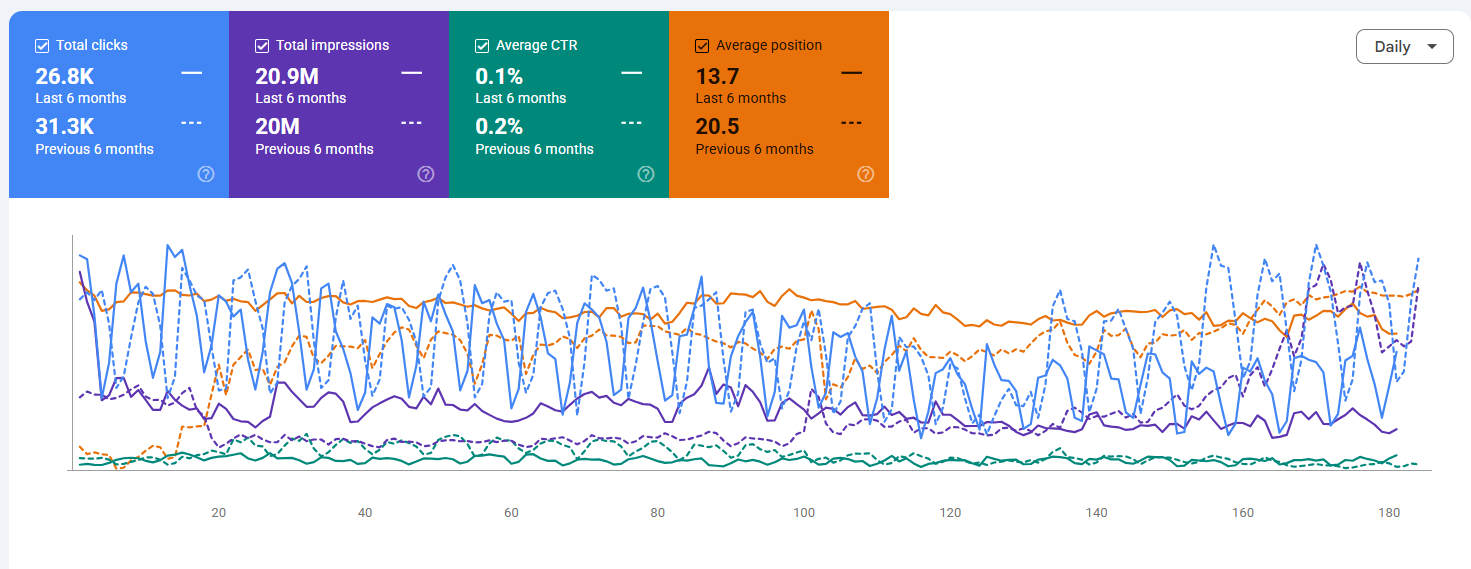
Look for pages showing:
- Fewer organic clicks
- Lower impressions
- Declining average search positions
- Reduced click-through rates
If a page has been steadily losing visibility, it may be experiencing content decay.
2. Review Organic Traffic in Google Analytics
Check which landing pages are receiving less organic traffic than they used to.
-Oct-22-2026-04-49-52-6036-PM.png?width=1373&height=481&name=unnamed%20(1)-Oct-22-2026-04-49-52-6036-PM.png)
Compare similar periods and look for declines in:
- Organic sessions
- Engaged sessions
- Leads
- Sales or other conversions
Be careful with seasonal content. A drop in traffic does not always mean the content is decaying.
3. Look for Lost Keyword Rankings
SEO tools such as Ahrefs, Semrush, or SE Ranking can help you identify keywords that have dropped in position.
-Oct-22-2026-04-52-11-0088-PM.png?width=777&height=496&name=unnamed%20(2)-Oct-22-2026-04-52-11-0088-PM.png)
Pay close attention to pages where important keywords have moved from:
- Positions 1 to 5 into positions 6 to 10
- Page one to page two
- Consistent rankings in a steady downward trend
Even a relatively small ranking decline can cause a noticeable traffic loss.
4. Compare Your Content With Current Search Results
Search for the main keywords your page targets.
Review the pages that now rank above yours. Ask:
- Is their information more current?
- Do they answer the searcher's question more clearly?
- Do they cover topics your page misses?
- Are they using better examples, statistics, or supporting information?
- Has the type of content Google shows changed?
Your page may still be accurate, but competing pages may now provide a better answer.
5. Rule Out Other Causes
A traffic decline is not automatically content decay.
Before updating the page, check for:
- Technical SEO problems
- Indexing issues
- Broken or removed internal links
- Website migrations
- Major search algorithm changes
- Seasonal demand
- Falling search volume for the topic
This helps you avoid updating content when the real problem is elsewhere.
Which Pages Should You Update First?
Prioritize pages that:
- Previously generated strong organic traffic
- Have declined consistently for several months
- Target valuable keywords
- Generate leads or revenue
- Still address topics your audience cares about
- Have a realistic opportunity to regain rankings
For example, imagine a guide received 2,000 organic visits per month last year, but now receives 900. Its main keyword has also dropped from position 3 to position 11. That combination is a strong indication of content decay.
The goal is not to update every old page. Focus your effort on pages where recovering lost visibility can have a meaningful impact on traffic, leads, and revenue.
Start with pages that used to perform well, still target relevant searches, and contribute to leads or revenue. Recovering a valuable page from position 11 to the first page may matter more than updating several low-value pages that have never performed well.
Tools for Identifying Content Decay
Businesses should leverage various SEO tools to monitor content performance and detect early signs of content decay. These tools provide insights into traffic trends, keyword rankings, engagement metrics, and other crucial indicators that help businesses make informed decisions about content updates and improvements.
Google Analytics
Google Analytics is an essential tool for tracking organic traffic trends and user engagement metrics. It allows businesses to monitor traffic fluctuations over time and compare performance across different periods. Businesses can assess how effectively their content keeps visitors engaged by analyzing session duration, pages per session, and bounce rate. Google Analytics also provides data on traffic sources, helping businesses understand whether their content attracts visitors from search engines, social media, or referral sites.
Google Search Console
Google Search Console is another powerful tool for tracking keyword rankings, impressions, and click-through rates. It helps businesses identify which keywords are driving traffic to specific pages and whether rankings are improving or declining. Businesses can refine their content strategy by analyzing search queries and more effectively target relevant keywords. Search Console also provides valuable insights into indexing issues, mobile usability, and technical errors affecting search visibility.

Semrush and Ahrefs
Semrush and Ahrefs are advanced SEO platforms that provide in-depth analysis of keyword positioning, backlink profiles, and competitor performance. These tools allow businesses to track their rankings across multiple keywords, analyze traffic trends, and compare their content performance against competitors. Ahrefs, in particular, excels at identifying lost backlinks and providing insights into which pages are gaining or losing authority. Sermush, on the other hand, offers detailed content audits and keyword research tools that help businesses identify content gaps and optimization opportunities.
Clearscope
Clearscope is a content optimization tool that evaluates content relevance, readability scores, and keyword coverage. By analyzing top-ranking pages for a given keyword, Clearscope provides recommendations on related terms, content length, and structure to improve search rankings. Businesses can use Clearscope to ensure their content is comprehensive, well-structured, and aligned with current search trends.
Content Auditing and Proactive Optimization
Regularly auditing content using these tools allows businesses to identify declining performance early and proactively optimize their pages. When signs of content decay appear—such as dropping rankings, reduced traffic, or lower engagement rates—businesses can update their content with fresh information, improved formatting, and better keyword optimization.
Some effective strategies for updating existing content include:
- Refreshing outdated statistics and references: Keeping content current ensures accuracy and trustworthiness.
- Expanding content depth: Adding new sections, case studies, or expert insights can improve value and relevance.
- Enhancing readability and formatting: Breaking up large blocks of text, adding bullet points, and incorporating visuals improve user experience.
- Optimizing for new keywords: Adapting content to include emerging search terms helps maintain rankings.
- Internal linking improvements: Adding links to newer content and related pages helps search engines understand content relationships.
By staying proactive in content monitoring and optimization, businesses can prevent content decay, maintain search visibility, and ensure their content continues to attract and engage users over time.
How to Fix Content Decay and Keep Your Content Fresh
Content decay happens when a page gradually loses traffic, rankings, engagement, or conversions. The best response depends on why performance is declining.
Update Outdated Information
Review the page for old statistics, examples, links, product details, and recommendations.
Replace outdated information with current and accurate content. Search engines and readers are more likely to trust pages that stay relevant.
Improve Search Intent Alignment
Check the current search results for your target keywords.
Look at what users appear to want now. If competing pages answer the topic more clearly or completely, update your content to better match those needs.
Refresh Titles and Meta Descriptions
A page can rank well but still receive fewer clicks.
Review the title and meta description to make sure they clearly explain what the page offers. Compare them with competing search results and improve clarity where needed.
Expand Thin or Incomplete Sections
Add useful information where the page no longer covers the topic well enough.
This may include:
- New questions customers are asking
- Updated examples
- Additional supporting information
- Clearer explanations
- Relevant FAQs
Avoid adding content simply to make the page longer. Every section should help the reader.
Improve Page Structure
Make the content easier to scan and understand.
Use:
- Clear headings
- Short paragraphs
- Bullet points
- Descriptive subheadings
- Simple language
A clear structure also helps search engines and AI tools understand the main topics on the page.
Strengthen Internal Links
Add links from relevant pages on your website to the decaying content.
Internal links help users discover related information and can help search engines understand the importance and context of the page.
Also review links within the page and replace any that are broken or outdated.
Review Keywords and Related Topics
Search behavior changes over time.
Check whether the keywords the page targets are still relevant. You may find new terms, questions, or related topics that should be included.
Update the content naturally rather than repeating keywords unnecessarily.
Improve User Experience
Performance problems can contribute to content decay.
Check:
- Page speed
- Mobile usability
- Navigation
- Readability
- Calls to action
- Accessibility
Visitors should be able to find information and complete the next step without unnecessary difficulty.
Update Visual Content
Replace old screenshots, charts, graphics, or videos.
Current visuals can improve understanding and help keep the page useful, especially when the content covers products, software, statistics, or changing processes.
Review Backlinks
Check whether the page has lost important backlinks.
If the content has been updated, consider contacting relevant websites that previously linked to the page. You can also promote the refreshed content through your existing marketing channels.
Combine Competing Pages
Sometimes several pages on the same website cover very similar topics.
This can cause them to compete with each other in search results.
Consider combining weaker pages into one stronger resource, then redirecting outdated URLs where appropriate.
Monitor Performance After Updating
Track results after making changes.
Monitor:
- Organic traffic
- Keyword rankings
- Impressions
- Click-through rate
- Engagement
- Conversions
- Backlinks
Content recovery often happens over time. Continue reviewing performance and make further updates when the data shows they are needed.
Changing the publication date is not a content refresh. Update the information, examples, sources, search intent, internal links, page structure, and recommendations where needed. The refreshed page should provide a better answer than the previous version.
Strategies for Updating Content to Answer More Complex Questions
As search engines evolve, so do the expectations of users. Simply providing basic information is no longer enough; modern searchers expect in-depth, well-structured answers that thoroughly address their questions. Updating content to reflect current trends, emerging best practices, and more nuanced insights ensures that it remains relevant and valuable to users and search engines. This requires a strategic approach to content updates, focusing on improving accuracy, depth, and usability.
Conducting a Comprehensive Content Audit
A content audit is a crucial first step in identifying areas for improvement. This process involves reviewing existing content to determine whether it remains relevant, useful, and competitive. Businesses should assess whether their pages are experiencing traffic or ranking declines, as these can be indicators that the content needs updating.
Beyond performance metrics, a content audit should also evaluate search intent alignment. Over time, the user intent behind certain queries may shift. For example, a search query that previously indicated informational intent (e.g., "best marketing tools") may now suggest transactional intent, with users expecting product comparisons and purchase options. Ensuring that content meets current search intent improves its chances of ranking well.
Comparing existing content with top-performing competitor pages is another essential audit step. Search engines favor comprehensive and authoritative content, meaning businesses should analyze competing articles that rank higher and identify gaps in their own content. Questions to consider include:
- Do competitors provide more in-depth explanations or updated data?
- Are they incorporating additional subtopics that we have overlooked?
- Do they use a more engaging structure, such as interactive elements or visual aids?
Businesses can develop a targeted plan to update and expand their content by identifying weaknesses and opportunities.
Expanding Topic Coverage for Greater Depth
Search engines increasingly prioritize comprehensive content that provides users with a one-stop solution to their queries. Updating existing content to include more nuanced explanations, detailed insights, and additional subtopics can significantly improve its performance.
For instance, a blog post from 2020 about social media marketing trends may no longer be relevant due to platform changes, new algorithms, and shifting user behaviors. Instead of simply tweaking old information, businesses should expand the scope of the content by addressing the following:
- The latest updates from major platforms (Facebook, Instagram, TikTok, LinkedIn, etc.)
- How AI and automation are reshaping social media marketing
- New engagement strategies that reflect current user behavior
- Emerging trends, such as short-form video dominance and influencer partnerships
Incorporating these elements transforms outdated content into an authoritative, up-to-date resource that will likely rank well and attract new readers.
Providing Actionable Advice While Removing Irrelevant Details
Content should inform and guide users toward practical solutions. While expanding topic coverage is essential, businesses must ensure that content remains actionable and easy to digest. Instead of overwhelming readers with unnecessary theory or overly technical explanations, content should provide clear steps that users can implement immediately.
For example, in an article about SEO best practices, rather than delving deeply into the history of search engine algorithms, the focus should be on practical steps such as:
- Use Google Keyword Planner to identify high-traffic, relevant keywords.
- Analyze top-ranking competitor content to understand keyword placement and structure.
- Optimize on-page elements such as meta descriptions, headers, and internal links.
- Regularly update existing content with fresh insights and new statistics.
- Improve page speed and mobile-friendliness for better user experience.
By structuring content with clear steps, real-world examples, and concise explanations, businesses can ensure that users quickly find the information they need, leading to higher engagement and better retention rates.
At the same time, it's crucial to eliminate outdated or unnecessary details that do not contribute to solving the reader's problem. For example, an article about email marketing automation might still reference tools that are no longer in use or strategies that have been replaced. In that case, those sections should be removed or rewritten to reflect current best practices.
Enhancing Content Format and Readability
Even the most well-researched content can underperform if it is not structured in a reader-friendly format. Improving readability and engagement involves several key strategies:
- Breaking up large blocks of text into smaller paragraphs for easier scanning.
- Use subheadings strategically to guide readers through different sections.
- Incorporate bulleted lists and numbered steps to present key takeaways.
- Add visuals such as charts, infographics, or screenshots to illustrate complex points.
For example, in an article about effective time management for entrepreneurs, rather than presenting a long, text-heavy explanation, businesses can break down advice into easy-to-follow sections with step-by-step guides, real-life examples, and visual representations of productivity frameworks.
By making content more accessible and engaging, businesses increase the likelihood that users will stay longer on the page, interact with the content, and share it with others.
Optimizing for Voice Search and Conversational Queries
Updating content to include natural language phrases and conversational keywords as voice search grows can help it rank for voice-assisted queries. Users who type searches may enter short keywords, but those using voice assistants often phrase their searches as complete questions or conversational prompts.
For example, instead of targeting a keyword like "best coffee shops NYC," businesses should consider incorporating long-tail, conversational phrases like:
- "Where can I find the best coffee shops in New York City?"
- "What are some highly rated cafés near Central Park?"
- "Which coffee shops in NYC have the best cold brew?"
Integrating FAQ sections with direct, natural-sounding answers can improve content visibility for voice search and featured snippets, making it more likely to appear as a top result.
Enhancing User Experience
A well-structured page improves readability and keeps users engaged. Consider leveraging the following tactics:
- Add a sticky table of contents for easy navigation.
- Use branded graphics and high-quality images to improve visual appeal.
- Break up long paragraphs into smaller chunks for better readability.
- Use bullet points and bold key takeaways to highlight important information.
Adding Trust Factors and Freshness Signals
Here are a few strategies to add trust factors and freshness signals to your content:
- Updating Statistics, Case Studies, and Examples: One of the most effective ways to signal freshness is by updating data and statistics. Incorporating recent industry studies, surveys, and real-world case studies enhances credibility. Users trust content that reflects the latest trends and insights.
- Adding Authoritative Sources and Expert Quotes: Including expert opinions, references from credible sources, and interviews with industry leaders can strengthen content authority. Citing well-known research institutions, government sources, and trusted organisations enhances credibility and trustworthiness.
- Leveraging User Engagement Signals: Encouraging user interaction through comments, polls, and discussions can help keep content relevant. Regularly updating blog posts with user-generated content, such as testimonials or frequently asked questions, signals ongoing engagement and relevance.
- Republishing and Promoting Updated Content: Once content has been refreshed, businesses should actively promote it across various channels:
- Share updated articles on social media platforms.
- Include refreshed content in email newsletters.
- Leverage paid promotion to reintroduce the content to a broader audience.
- Encourage backlinks by reaching out to industry partners and influencers.
Optimizing for Featured Snippets and Voice Search
Optimising content for featured snippets and voice search as search behavior evolves can enhance visibility. Structuring content with direct, concise answers and using natural language improves the chances of appearing in voice search results and position-zero rankings.
Content decay is inevitable, but proactive content refresh strategies can ensure sustained visibility, engagement, and SEO performance. By identifying declining content, updating it with fresh insights, and implementing trust factors, businesses can maximize the impact of their existing content and strengthen their digital marketing efforts. Regular content audits and a commitment to continuous improvement will position businesses for long-term success in an ever-changing search landscape.
Need help with your content marketing and SEO? Contact WSI today.