
Key Highlights
- What the FAQ blog post format is and why it works for SEO
- How FAQs fit into your overall content strategy
- Why FAQ content is now a critical signal for AI search tools
- How to structure your FAQ answers for both readers and LLMs
- The truth about FAQ schema in 2025 and beyond
- A step-by-step process for writing FAQ blog posts that get results
Editor's Note: This post was originally published in June 2023 and has been updated with additional content about different types of landing pages in July 2026.
If you want to know how to write an FAQ blog post that earns traffic from Google and gets cited by AI tools like ChatGPT and Perplexity, you are in the right place. FAQ content is one of the most-searched and most-shared formats in digital marketing, and it is also one of the most powerful tools for AI search optimization. Yet most marketers are still using it the wrong way.
Learn how to create the best FAQ pages for your strategy.
What Is the FAQ Blog Post Format?
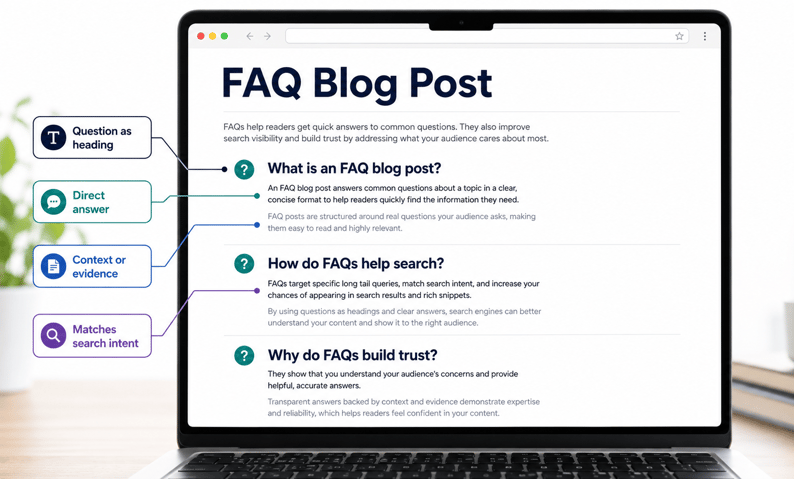
An FAQ blog post uses a question-and-answer format to address the most common questions your audience has about a topic, product, or service. Each question becomes a section heading. Each answer is direct, specific, and supported by context or evidence.
FAQs are used across websites, blog posts, and pillar content for one simple reason: they match how people actually search. When someone types a question into Google or asks an AI tool, they want a direct answer. FAQ content does exactly that.
As all good digital marketers know, audiences want to connect with a company that understands them and offers content that addresses their specific challenges. FAQs deliver what your audience needs, when they need it, building trust while educating and informing.
| Pro Tip Start every FAQ answer with a direct, one-sentence response to the question. AI tools pull citations from the first sentence of each answer, so the clearer and more specific that sentence, the better your chances of being cited by ChatGPT, Perplexity, or Google AI Overviews. |
Where Do FAQs Fit Into a Blog Strategy?
A FAQ page on your website or blog post offers a comprehensive and holistic insight into a topic by answering the most popular and frequently asked audience questions. The FAQ format tends to be more visible and valuable, with content geared toward the top of the marketing funnel, drawing customers into the journey.
FAQs are also a great source for blog content ideas. Tools like Answer The Public or even Google Trends can help you identify what your audience wants to learn more about, and you can then use that data to form the basis of a cluster content strategy, with topics offering readers a selection of destinations and resources that answer their questions.
At the end of the day, strong FAQ content creates goodwill toward your brand, positions you as an authority in your space, and encourages readers to engage with your products and services.
FAQ Content for SEO: Why It Still Matters
An effective FAQ section improves your search performance in two ways: it helps Google understand your content, and it increases your chances of appearing in question-based SERP features like People Also Ask.
When building your FAQ content, start with the questions your audience is actually searching for. Tools like Answer the Public, Google's People Also Ask feature, and even your own customer service data are excellent starting points. Once you know the questions, you can use keyword research tools to identify which ones have the highest search volume and the lowest competition.
An effective FAQ page or section should be easy to navigate. Where content is long, add a table of contents at the top so readers can jump to the question they care about most.
How FAQs Enhance Your Content Strategy
Integrating FAQs into your content strategy can significantly improve your website’s ability to meet your audience's needs while enhancing SEO. The FAQs page design should be considered part of your content clusters, serving as an essential resource for answering questions about your products or services.
An effective FAQ page can support your customer success by answering commonly asked inquiries upfront, reducing the need for additional customer support. By crafting an FAQ page that addresses a wide range of questions, you improve the likelihood of keeping readers engaged. They won’t feel forced to scroll through irrelevant content but will instead find what they’re looking for immediately, enhancing the overall user-friendly experience.
When properly structured, FAQs can be the bridge that links customers from one pillar page to another. For example, if someone reads your FAQ blog post about your product features, they might be encouraged to visit your pillar page to learn more about your brand. This keeps visitors on your site and helps improve SEO results by reducing bounce rates and increasing time on the site.
Why FAQs Are Powerful for AI Search
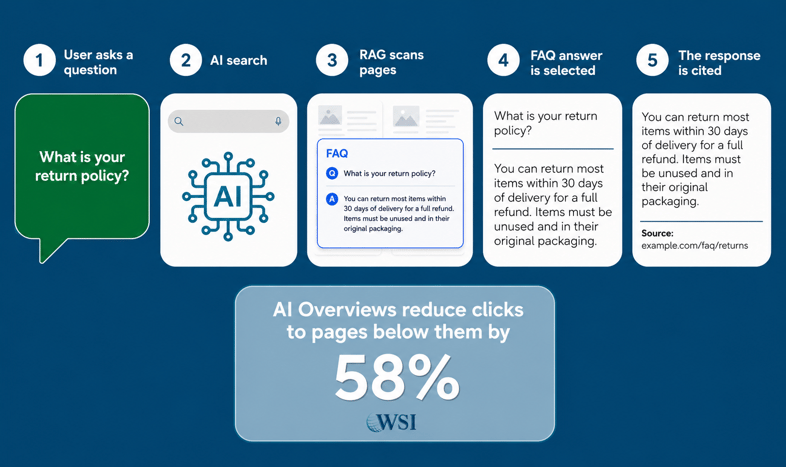
AI search tools like ChatGPT, Perplexity, and Google AI Overviews do not rank pages the way Google does. They use a process called Retrieval-Augmented Generation (RAG), which means they scan web pages for specific passages that directly answer the user's question, then cite those passages in their response.
FAQ sections are one of the best formats for AI citation because they are already structured as question-and-answer pairs. When a user asks an AI tool a question, it looks for the clearest, most direct answer it can find. A well-structured FAQ answer, starting with a direct response and supported by specific data, is exactly what these tools are looking for.
AI-referred sessions now spend 68% more time on-site than traditional organic visitors. AI Overviews already reduce clicks to pages below them by 58%.
If your FAQ content is not optimized for AI search, you are leaving a rapidly growing traffic and citation channel on the table.
94% of B2B buyers used a generative AI tool during their most recent purchase process. If your FAQ content is not in those answers, a competitor's probably is.
Why FAQ Schema Is Still Relevant for AI
Google removed FAQ rich results from search results on May 7th, 2026. If you are still expecting the FAQ schema to generate a Google snippet, it will not. However, the FAQ schema is still highly valuable. AI platforms like ChatGPT and Perplexity use structured data to identify and extract Q&A content when building their responses. Keep your FAQ schema; just think of it now as a GEO asset rather than a Google rich result trigger.
FAQ schema (FAQPage in JSON-LD format) signals to AI tools that your page contains structured question-and-answer content. It improves extractability and makes it easier for LLMs to identify exactly which part of your page answers a specific query. Adding citations in your answers increases AI visibility by up to 40%, according to the Princeton GEO Study.
How to Write an Effective FAQ Blog Post: Best Practices
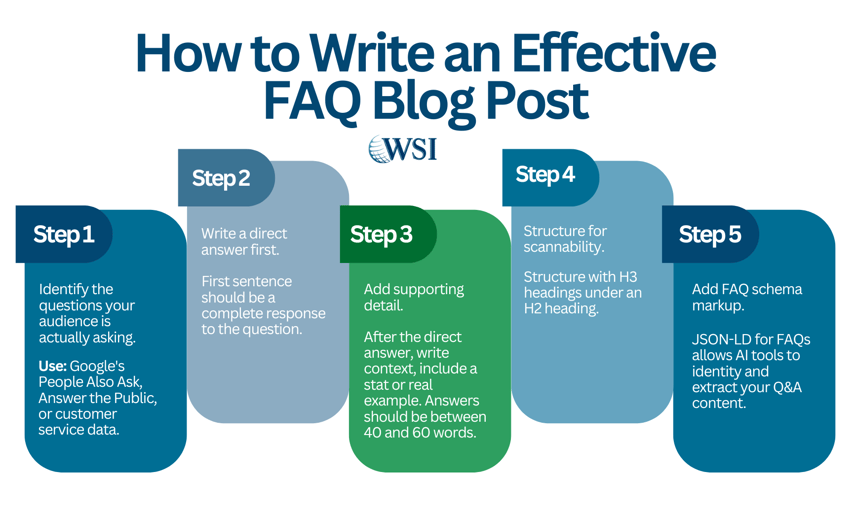
The secret to writing a high-performing FAQ blog post is starting each answer with a direct, clear response to the question. The better your first sentence, the better your chance of appearing in AI-generated answers and the happier your reader will be.
1. Identify the questions your audience is actually asking.
Use Google's People Also Ask, Answer the Public, or your own customer service data to find real, high-volume questions.
2. Write a direct answer first.
The opening sentence of every FAQ answer should be a complete, standalone response to the question. Do not bury the answer in context.
3. Add supporting detail.
Follow the direct answer with context, a relevant statistic (sourced and dated), or a real example. Keep answers between 40 and 60 words for optimal AI citation.
4. Structure for scannability.
Use your questions as H3 headings under a parent H2 FAQ section. Add a table of contents if the post is long enough to need one.
5. Add FAQ schema markup.
Implement the FAQPage schema in JSON-LD format. This helps AI tools identify and extract your Q&A content when building responses.
How to Structure Your FAQ Answers for AI
AI tools extract the clearest, most direct passages from web pages. To give your FAQ answers the best chance of being cited, follow this structure for every answer:
- Sentence 1: Direct answer to the question (40 words or fewer)
- Sentence 2-3: Supporting context, data, or example
- Optional: Internal link to a related page or deeper resource
Avoid vague openers like 'Great question' or 'It depends.' Start with the answer. AI tools and readers both reward directness.
Effective FAQ Page Examples
Shopify SEO FAQ
Shopify’s SEO FAQ works because it uses real user questions, such as why a site does not appear in Google, how to check indexing, and how to spot missing page elements. It also includes an “On this page” section, which helps users scan before reading.
Best for: E-commerce, SaaS, and local service businesses.
What to note: Use plain questions that your customers actually ask. Group them by intent, such as setup, pricing, delivery, returns, support, and troubleshooting.
Airbnb Help Center
Airbnb’s Help Center works because it routes visitors by task, such as reservations, payments, account issues, safety, and hosting. It also gives users a clear path to contact support when self-service is not enough.
Best for: Marketplaces, booking platforms, travel, and property services.
What to note: Do not make users scan one long page. Break FAQs into task-based sections.
Slack Help Center
Slack’s Help Center uses clear categories such as getting started, using Slack, profile preferences, tools, workspace administration, tutorials, videos, and status. This is useful for products with many features and different user roles.
Best for: SaaS, software, apps, B2B tools.
What to note: Build FAQs around user roles. For example, “For admins,” “For new users,” and “For billing contacts.”
OpenAI ChatGPT Business FAQ
OpenAI’s ChatGPT Business FAQ answers high-intent buyer questions, including what the plan is, how to sign up, how it compares with Enterprise, and whether it works on mobile. This is a good model for pricing and sales-support FAQs.
Best for: B2B services, software, subscriptions, and professional services.
What to note: Use FAQs to remove buying friction. Answer pricing, plan, security, setup, and comparison questions before the sales call.
Sephora Same-Day Delivery FAQ
Sephora’s Same-Day Delivery FAQ is effective because it focuses on one specific service. It answers practical questions about delivery timing, payment options, cancellation, refunds, returns, gifts, tips, and scheduled delivery windows.
Best for: Retail, ecommerce, restaurants, and local delivery services.
What to note: Create separate FAQ pages for major services. A focused FAQ often works better than one large general FAQ.
Ready to Make Your Blog Work for AI Search?
At the end of the day, the responsibility of any content marketer is to create good, quality content that your audience wants to interact with. And FAQ pages, when used properly, can answer your audience's questions quickly and efficiently.
We want to work with you to identify the untapped possibilities in your business. If you need assistance or want to know how to write an FAQ blog post, contact WSI. Our team is happy to help.