
Key Highlights
- Customer signals reveal buying intent. Behavior-based automation helps teams act on interest before opportunities go cold.
- Relevance beats rigid scheduling. Emails perform better when timing follows customer behavior, not campaign calendars.
- Lifecycle context improves follow-up. Matching messages to decision stages helps prospects move forward with less friction.
- Behavior should guide segmentation. Customer actions create smarter nurture paths than static lists or broad assumptions.
- AI supports, strategy leads. AI can scale execution, but human judgment keeps communication useful and trusted.
- Sales handoffs need better signals. Connected email and CRM data help teams spot when prospects are ready for outreach.
- Measurement should connect to revenue. Opens and clicks matter less when workflows are not tied to pipeline or repeat sales.
- Connected systems create growth clarity. Email, CRM, and analytics alignment shows which customer journeys actually drive results.
Customers leave clues in almost every interaction, but disconnected email systems often miss them.
Email is still too often treated like a distribution channel: send the campaign, trigger the workflow, check the open rate.
That approach leaves too much value on the table. When email is built around customer behavior, it becomes a revenue system. It can respond to intent, support the next decision, and create more value from the audience already in your database.
The tools are often already there: automation platforms, CRM data, website activity, ecommerce insights, and customer engagement signals. The problem starts when those pieces do not work together.
Customers browse products, download guides, abandon carts, compare services, open emails, ignore emails, request pricing, or go quiet after a purchase. Each action offers a clue about timing, interest, or readiness to buy.
Disconnected email systems miss those clues. Contacts receive similar messaging regardless of interest level, timing, purchase history, or stage in the buyer’s journey. The communication may be consistent, but it is not always relevant.
Engagement slips when timing and relevance fall out of sync. Conversions slow because the next message does not match the next decision. Retention weakens because follow-up feels generic instead of useful.
A stronger email model organizes communication around customer progression. Every message has a job: help someone take the next useful step, whether that is making a decision, completing a purchase, buying again, or staying engaged after the sale.
Why Email Automation Breaks Down When Context Is Missing
Email automation rarely fails because a business sends too few emails. It fails when the system does not understand enough about the person receiving them. This is where frequency needs strategy. Fewer, better-timed messages often outperform higher volume when the goal is to move people toward a decision.
A new lead, a returning customer, and a pricing-page visitor should not all receive the same follow-up. They are in different moments, asking different questions, and weighing different decisions.
Workflows start to break in three common places.
The message is too broad.
The same nurture sequence goes to every contact, even when their needs are different. A first-time visitor may need education. A comparison-stage prospect may need proof. A past customer may need a timely reason to re-engage.
The timing is too rigid.
Many workflows still run on fixed delays: wait three days, send the next email. That can keep communication moving, but it does not always match when interest is highest.
The intent is missed.
A pricing-page visit, abandoned cart, repeat website visit, or sudden silence after strong engagement may all point to a next step. If the email system cannot respond to those moments, automation creates activity without creating progress.
Better automation uses context to guide the next step. It looks at who someone is, what they have done, and which decision they may be closest to making.
Match the Message to the Customer’s Next Decision
A stronger email system starts with a simple question: what decision needs support next?
The answer changes as the relationship develops. Someone discovering your business needs a different message than someone comparing options, reviewing pricing, or deciding whether to buy again.
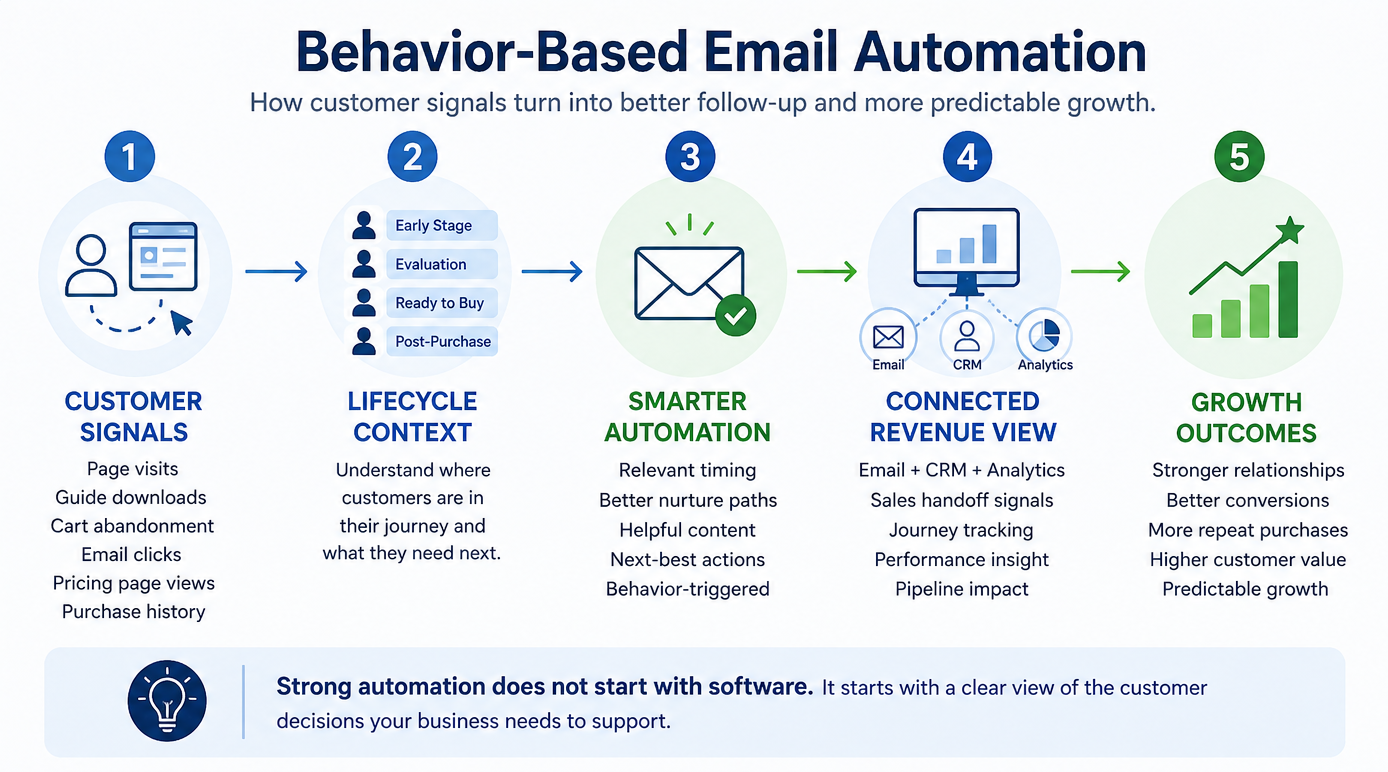
A simple lifecycle view keeps the communication useful:
Automation becomes more valuable when it responds to behavior instead of a fixed calendar.
A lead who reads three service pages may need a comparison guide. Someone who abandons a cart may need reassurance, an incentive, or a reminder. A customer who has not engaged in months may need a useful reason to return, not another generic promotion.
Every email does not need to feel hyper-personalized. It needs to feel appropriate to the moment. That shift turns automation from scheduled communication into useful follow-up.
Use Behavioral Data to Decide the Next Best Step
Once the customer lifecycle is clear, behavioral data helps determine which message should come next.
The best clues are often already available through your website, CRM, ecommerce platform, or email system. You do not need to track everything. Focus on the signals that reveal interest, hesitation, timing, or readiness to buy.
Start with the behaviors that reveal intent:
Behavioral data works best when it guides relevance, not when every click becomes a trigger.
Segments and nurture paths help put those signals to work. A new lead should not receive the same sequence as a repeat customer. A high-intent prospect should not be treated the same as someone who downloaded one introductory resource six months ago.
Behavioral data helps automation sort those differences. Each person gets a path based on what they have shown you, not just where they sit on a calendar. Strong automation does not start with software. It starts with a clear view of the customer decisions your business needs to support.
Where AI Helps, and Where Human Strategy Still Leads
AI helps email teams find patterns faster and manage more customer paths without adding unnecessary manual work. It can spot behavior trends, suggest segments, draft content variations, and show which messages are driving engagement.
Strategy still needs human judgment
People still need to guide the big questions: who the message is for, what they need, what action makes sense next, and how the message should sound. Without that direction, AI can create more content without improving the communication.
AI works best as support for the system
AI can help identify when a lead is showing stronger buying intent. It can surface which topics are attracting the most engagement. It can help personalize subject lines, recommend send times, and summarize performance trends faster than a team could manually.
The strategic choices still belong to people
Your team decides when a prospect needs education instead of a sales push. It decides when a customer needs reassurance, proof, urgency, or space. It protects the brand voice, keeps the message useful, and prevents automation from overwhelming the relationship.
With the right strategy, AI helps lean teams scale email communication without losing control. It improves speed and precision while human judgment keeps the experience relevant, trustworthy, and aligned to business goals.
Connect Email, CRM, and Analytics Into One Revenue View
Email automation works best when it has a full view of the customer. Your email platform, CRM, website data, ecommerce activity, and analytics should connect around the same customer journey.
When those systems are disconnected, teams end up guessing. Marketing may keep nurturing someone who is ready for sales. Sales may miss a prospect who has been showing buying intent for weeks. Customer follow-up may depend on memory instead of clear signals.
A connected revenue view helps every team see who is engaging, what they care about, where they are in the relationship, and which next step makes sense.
Connect the Tools That Shape the Customer Journey
Your email platform manages communication. Your CRM tracks relationships and sales activity. Your analytics tools show what people do before and after they engage.
Each tool has value on its own. Connected, they create a clearer picture of customer intent.
A connected setup can show when someone clicks an email, visits a service page, downloads a guide, requests pricing, and later speaks with sales. That journey tells a clearer story than an open rate alone.
Use CRM Data to Improve the Sales Handoff
Email automation should nurture leads and help identify when someone is ready for a human conversation.
CRM data makes that possible. When email engagement connects to lead status, deal stage, purchase history, or sales notes, the handoff becomes more precise.
Strong sales handoff signals may include:
- Repeat visits to pricing or service pages
- Multiple clicks on product or solution-specific emails
- Form abandonment after viewing high-intent content
- Re-engagement after a long period of inactivity
- Downloads of comparison guides, buyer guides, or implementation resources
These signals help sales teams prioritize outreach based on behavior, not guesswork.
Measure More Than Opens and Clicks
Open rates and click-through rates are useful, but they do not tell the whole story. A stronger email program connects engagement to business outcomes.
That means looking at what happens after the click.
Better performance questions include:
- Which email paths create qualified leads?
- Which nurture sequences support sales conversations?
- Which customer segments convert faster?
- Which messages help increase repeat purchases?
- Where do people drop off before taking action?
These questions move email measurement from campaign reporting to revenue insight.
They also help leaders see which workflows support revenue and which ones simply keep the email calendar busy.
Build a Feedback Loop Between Marketing and Sales
Connected systems also create a better feedback loop. Marketing can see which emails and topics produce stronger opportunities. Sales can share which messages create better conversations. Customer-facing teams can identify repeated questions, objections, or points of confusion.
That feedback improves the next version of the workflow.
Over time, the email program improves because it learns from real customer behavior and real sales outcomes. The result is a more useful customer experience and a clearer path from engagement to revenue.
Turn Better Communication Into Predictable Growth
Email automation builds stronger customer relationships when every message has a clear purpose.
Strong email programs do not rely on more sends, louder promotions, or longer nurture sequences. They use customer behavior to guide timing, content, and next steps. That helps teams turn interest into action with less guesswork.
When email, CRM, analytics, and human strategy work together, automation becomes a practical growth engine. It can support pipeline development, improve conversion paths, encourage repeat purchases, and keep relationships active after the first sale.
Predictable growth comes from repeatable decisions: knowing which signals matter, which message should follow, and when a human conversation needs to happen.
Ready to build email automation that strengthens customer relationships and supports measurable growth? Connect with a WSI expert to map the customer signals, nurture paths, and revenue opportunities already sitting inside your business.