.jpg?width=70&height=70&name=McKay%20Salisbury%20Profile%20Photo%20(five%20star%20commerce).jpg)

Key Highlights
- How Amazon's Cosmo AI reads and interprets your product listings
- The difference between the A9/A10 algorithm and AI-powered intent matching
- 15 questions your listings must answer to be recommended by Rufus
- How to use this checklist to audit your titles, bullets, descriptions, and images
- A step-by-step action plan covering Amazon product keyword research, title optimization, and image requirements
- The data behind AI-driven conversion rates on Amazon
Editor's Note: This post was originally published in September 2025 and has been updated with additional content about different types of landing pages in July 2026.
Amazon COSMO (Common Sense Knowledge Generation and Serving System) is the AI that powers how Amazon understands what shoppers actually need, not just the words they type.
It works in three ways. First, it learns from shopping behavior: searches, clicks, purchases, and browsing patterns across hundreds of millions of transactions. Second, it uses that data to build a knowledge graph that connects products to the situations, needs, and intent behind every search. So 'men's shoes for wedding' doesn't just return products with those keywords. It returns products that fit the understood need: formal footwear for a formal occasion.
Third, it uses large language models to scale this process across every product category on Amazon, continuously adding new connections between products, use cases, and buyer intent.
This is why keyword stuffing no longer works. Cosmo isn't scanning for word matches. It's asking a different question: does this listing give me enough information to confidently recommend this product to the right buyer?
This article focuses on Amazon’s “Cosmo” AI, but the principles apply to other AI tools such as ChatGPT as well.
How Amazon COSMO Works
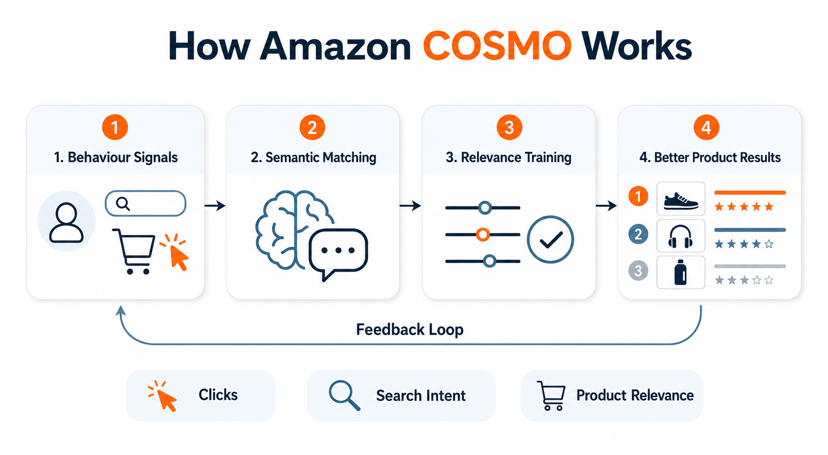
Amazon COSMO (Common Sense Knowledge Generation and Serving System) is an AI-powered system that helps Amazon understand what shoppers actually mean, not just the exact words they type.
How it works:
1. Learns From Customer Behavior
COSMO analyzes massive amounts of shopping activity, including:
- Search queries
- Product clicks
- Purchases
- Browsing patterns
- Products commonly bought together
From these interactions, it learns relationships between products, needs, and contexts.
2. Builds a "Common Sense" Knowledge Graph
Instead of storing only product attributes, COSMO creates a large network of knowledge connecting:
- Products
- Customer intentions
- Use cases
- Situations
- Related needs
For example:
- Running shoes → used for → exercise
- Winter jacket → provides → warmth
- Wedding shoes → should be → formal footwear
This helps Amazon understand the purpose behind a search.
3. Uses AI Models to Expand Knowledge
Amazon combines:
- Large Language Models (LLMs)
- Human-reviewed training data
- Knowledge graphs
The system generates new common-sense relationships and validates them before adding them to the knowledge base. Amazon's research paper describes a model called COSMO-LM that scales this process across millions of relationships and multiple product categories.
4. Matches Intent Instead of Keywords
Traditional Amazon search might focus on exact phrases.
COSMO tries to understand the need behind the query.
Example:
Search:
"men's shoes for wedding"
Traditional search:
- Products containing those keywords
COSMO:
- Understands the shopper likely needs formal dress shoes
- Surface products that fit that purpose, even if the listing doesn't use the exact wording.
| Cosmo doesn't just read your text. It reads your images too. A lifestyle photo showing who uses your product and in what context can answer multiple questions on this checklist without adding a single word to your listing copy. |
How the Amazon A9/A10 Algorithm Ranks Listings
Unlike Google, which ranks pages based on relevance and authority, Amazon ranks product listings based on revenue potential and customer satisfaction.
The process works in two stages. First, relevance filtering: Amazon scans your product title, bullet points, description, backend search terms, and category placement to decide if your product is relevant to the search query. If it doesn't pass this filter, it won't rank at all, regardless of how many sales you have.
Second, performance ranking: once relevant products are identified, Amazon ranks them by how likely they are to result in a purchase. The key signals are conversion rate, click-through rate, sales velocity, review quantity and recency, competitive pricing, and inventory availability. Products fulfilled through Amazon FBA often perform better here because Prime eligibility directly improves conversion rates.
The A9/A10 algorithm handles this ranking layer. Cosmo then operates on top of it, expanding which searches your listing is eligible for by interpreting the intent behind each query.
| If Amazon doesn't consider your product relevant to the search query, it will not rank regardless of your sales performance. Relevance filtering happens before any performance signals are considered. Start with your title, bullet points, and backend search terms. |
The 15 Questions Your Product Listings Need To Answer
The Cosmo AI will scan your listings (including images) to find answers to the questions shown below. For each question, we’ve included an example of what it might find as the answer for each question if it were scanning an optimized listing for a children’s sled.
Go through this checklist and make sure your listing answers each of these questions for your products. Make note of any missing or inadequately explained information based on the content of your product listing (i.e., product detail page).
|
Question |
Explanation |
Example |
|
1. What is the product, fundamentally? |
Give the simplest, clearest definition. |
“A durable plastic sled with built-in handles.” |
|
2. What function does the product perform? |
Clearly state the primary job your product does. |
“Designed for smooth, fast downhill sledding on snow.” |
|
3. What goal or outcome does the product help the shopper achieve? |
Explain the result the customer can expect. |
“Used to give kids an exciting, outdoor winter activity.” |
|
4. What events or situations is the product used for? |
Tie the product to specific occasions or scenarios. |
“Perfect for snow days, holiday vacations, or family sledding trips.” |
|
5. Who is the product for? |
Define the target user. |
“Made for kids ages 4–12.” |
|
6. What is the product capable of doing? |
Highlight performance or capacity. |
“Capable of handling up to 150 lbs and gliding over snow.” |
|
7. What role does the product play in a larger experience? |
Show how it fits into a bigger picture or bundle. |
“Can be used as a fun add-on to winter playsets or snow gear bundles.” |
|
8. When is it used? |
Specify the season, timing, or frequency of use. |
“Best used during snowy winter days.” |
|
9. Where is it typically used? |
Identify the common setting or location. |
“Ideal for backyards, hills, and local sledding parks.” |
|
10. What part of the body does it interact with? |
Point out how customers physically use or touch it. |
“Designed for children to sit on and grip with hands for stability.” |
|
11. What products is it paired with? |
Mention complementary products. |
“Use with snow boots, gloves, and warm winter clothing.” |
|
12. Who typically uses it? |
Broaden beyond the target demo—social proof. |
“Popular among families with young children and outdoor enthusiasts.” |
|
13. What lifestyle or interest does it support? |
Tie to identity, interests, or values. |
“Great for families who love outdoor play and winter activities.” |
|
14. How does the shopper see themselves using it? |
Position the product in the buyer’s self-image. |
“For parents who value active, screen-free fun for their kids.” |
|
15. What emotional or aspirational result does it create? |
Highlight feelings or future memories. |
“Want to create joyful winter memories and outdoor adventures.” |
Why These 15 Questions Matter for AI & Customers
Cosmo doesn’t just scan your text for keywords; it interprets the meaning, intent, and context. Listings that clearly answer these questions help AI match your product to the right customer queries, even if the shopper never mentions the exact words in your listing.
AI assistants like Rufus are already influencing purchase decisions for about 13.7% of Amazon searches, with usage projected to reach 25–35% by the end of 2025, according to Ecomtent’s analysis of AWS’s published Rufus capacity metrics (Ecomtent, Mar 27, 2025, AWS Machine Learning Blog, Oct 10, 2024).
These AI-driven searches often convert better than old-school keyword searches, which means the shoppers they bring you are more ready to buy. For example, shoppers engaging with AI-powered chat convert at 12.3% versus just 3.1% without it, representing a 4× conversion lift (Rep AI, 2025), and brands offering voice shopping options report approximately a 20% conversion rate increase (WiFiTalents, 2025).
| Shoppers who interact with Amazon's AI assistant Rufus convert at 4x the rate of shoppers using traditional keyword search. Optimizing for AI isn't just about rankings. It's about reaching buyers who are ready to purchase. |
How to Optimize Your Amazon Listings
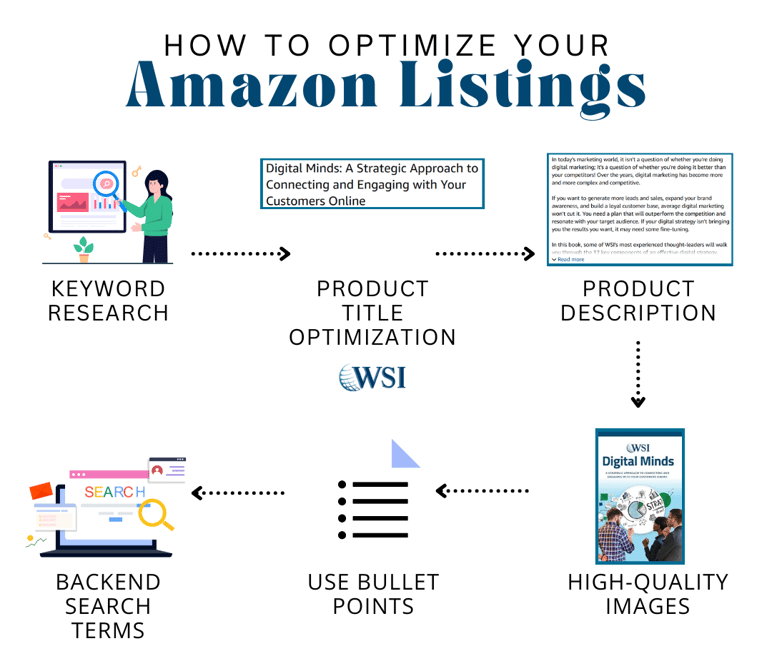
1. Amazon Product Keyword Research
Find terms shoppers already use when searching for products like yours. Start with Amazon autocomplete, competitor listings, PPC search term reports, customer reviews, and Brand Analytics. Prioritize keywords that show buying intent, such as product type, problem solved, size, material, and use case. Add keywords naturally across your listing. Avoid keyword stuffing, as it can make your listing harder to read and less persuasive.
2. Amazon Product Title Optimization
Use a clear structure: Brand + Product Type + Key Feature + Size + Use Case.
Your title should help shoppers understand the product quickly while including your most important keywords. Keep it readable, accurate, and focused on what matters most to the buyer. Avoid cramming in too many terms or making unsupported claims.
3. Amazon Product Description
Use the description to give shoppers the details they need before buying. Explain who the product is for, what problem it solves, how it is used, and what makes it different. Include key features, materials, dimensions, care instructions, and what comes in the package. Keep the copy clear and benefit-focused, but still specific.
4. Amazon Image Requirements
Use a clean, high-quality main image with the product on a white background and no extra text or graphics. Add supporting images that answer common buyer questions. Include lifestyle photos, size charts, feature callouts, packaging shots, close-ups, and comparison images. Your images should help shoppers understand scale, quality, use, and value without needing to read every word.
5. Amazon Listing Bullet Points
Use bullet points to highlight the main reasons someone should buy the product. Lead with benefits, then support each point with clear details. Keep each bullet focused on one idea, such as comfort, durability, ease of use, size, or what’s included. Include important keywords where they fit naturally. Avoid vague claims and long, crowded sentences.
6. Amazon Search Terms
Use backend search terms for keywords that do not fit naturally in the visible listing. Add synonyms, alternate spellings, abbreviations, and related terms shoppers may use. Do not repeat words already used heavily in your title or bullets. Avoid competitor brand names, misleading terms, unsupported claims, and irrelevant keywords. Keep this section focused on helping Amazon match your product with the right searches.
How You Design Your Listings to Answer Each of These Questions
You won’t be literally typing these fifteen questions and answers into your product listing. Instead, think of them as a checklist to guide how you present your product. For example, if the question is “Who typically uses it?” you might add lifestyle images showing families with young children enjoying the sled. You could also include a product graphic highlighting the sturdy handles and durable construction.
The goal is to make sure your listing, through text, images, and enhanced content, naturally communicates each of these details so an AI bot can fully understand your product. If your listing is missing something, update it to ensure each point is covered. Some tools can check your listings to quickly run this checklist for you.
Your Action Plan for AI-Ready Listings
- Audit Your Listings: Review each one against the 15-question checklist.
- Enhance Titles & Bullets: Use natural, benefit-driven language instead of specifically trying to cram in keywords.
- Update Descriptions: Even if your A+ content hides the standard description from customers, Amazon’s AI still reads it, so pack it with purpose, usage ideas, and problem-solving details.
- Include AI-Friendly Images: Amazon’s AI can read text and infer meaning from images. Use your product photos, brand story, and A+ content to communicate these key details.
- Monitor & Iterate: Use analytics to see how changes affect visibility and conversions. On Amazon, you can also use “Experiments” tools to test and compare listing versions.
Ready To Improve Your Amazon Results?
Amazon's shopping experience is shifting toward AI-powered recommendations. Sellers who structure their listings to answer the right questions now will reach more high-intent buyers before their competitors do.
If you want help auditing your digital marketing strategy or understanding how AI is changing how your customers find and buy, our team is ready to help. Amazon AI listing optimization is one part of a broader shift in how buyers interact with AI across every channel.
Talk to a WSI digital marketing expert today and find out what it would take to get your business in front of AI-driven buyers.