
Key Highlights
- How Google Search Console counts AI Mode impressions and clicks.
- Why is AI Mode data included in Web search totals, not shown as a separate report?
- What counts as a click, an impression, and a position in AI-powered search results?
- Why impressions may rise while clicks or CTR stay flat.
- How to review AI-related changes using GSC and GA4 together.
- What content changes can help your pages earn visibility and clicks from AI search?
Google is once again reshaping the SEO landscape, this time by introducing AI-generated traffic data directly into Google Search Console. The new "Google Search Console AI Mode" under the "Search Appearance" filter allows webmasters and digital marketers to see how their content performs in AI Overviews or Search Generative Experience (SGE) results.
With the rise of AI-powered search responses, understanding how users interact with your content through these channels has become crucial. This new data stream gives us insights into impressions, clicks, and visibility from AI-generated responses—insights that were previously unavailable.
In this post, we'll break down what Google's AI Mode update means, how you can use the new data to your advantage, and why it's essential for adapting your SEO strategy in the era of AI-driven search.
What Is Google's AI Mode in Search Console?

AI mode on GSC refers to a new data category in Google Search Console that specifically tracks traffic originating from AI-generated answers. This typically relates to the Search Generative Experience (SGE)—Google's AI-powered result format that presents summarized answers and key information snippets based on multiple content sources.
When content from your site is featured or referenced in an AI Overview, you now get detailed metrics showing how users interact with it. This includes impressions, clicks, and CTR for queries answered via AI responses, which are now labeled under a new "Search Appearance" filter called AI Overview or similar.
This feature gives digital marketers a deeper understanding of their visibility within the evolving AI-powered search experience.
Understanding Google AI Mode Impressions and Clicks
What counts as AI Mode clicks?
A click is counted when someone clicks a link in AI Mode that sends them to your website. If the user interacts inside Google but does not visit your site, that is not counted as a click.
What counts as an AI Mode impression?
An impression is counted when your link appears in AI Mode under Google’s standard impression rules. In practical terms, your page needs to appear in a qualifying AI Mode result.
How is the position counted?
AI Mode position follows the same method as a Google Search results page. Link cards, image blocks, and carousels may be counted using Google’s standard position rules for those elements, so average position can be harder to explain than a classic blue-link ranking.
Why This Update Matters for SEO
AI Overviews are dramatically altering how users engage with search results. Instead of clicking through multiple links, users often get summarized answers directly within Google's interface. This has led to a rise in zero-click searches, making it harder to measure actual engagement and traffic—until now.
With AI Mode data:
- You can track which pages appear in AI answers.
- Understand how AI-generated impressions convert into clicks
- See the impact of AI results on overall visibility.
This level of insight enables SEOs to make data-backed decisions, such as restructuring content for improved AI representation or identifying topics with high visibility but low engagement for further optimization.
How to Access AI Traffic Data in Google Search Console
To access the new AI traffic metrics, follow these steps:
- Log in to your Google Search Console account.
- Navigate to the Performance section.
- Click on "Search Appearance" at the top of the filter options.
- Select the filter labeled "AI Overview" or similar.
Once selected, you'll be able to view AI-specific traffic data, including:
- Queries triggering AI responses
- Pages featured in AI-generated results
- Corresponding impressions, clicks, CTR, and average position
This allows a focused analysis of how your content performs in the AI-generated search space.
What the AI Traffic Data Can Tell You
The AI Mode traffic data offers powerful insights for SEO professionals:
- Impressions: See how often your content is being surfaced in AI responses.
- Clicks: Identify whether users are clicking through to your site from those results.
- CTR (Click-Through Rate): Understand engagement efficiency.
- Page Performance: Discover which pages are AI-friendly and driving traffic.
- Query Relevance: Identify new keywords and questions that trigger AI results with your content.
These metrics are critical to understanding how your content fits within the AI search ecosystem—helping you pinpoint strengths and areas for improvement.
How to Optimize for AI Mode
Google says there are no special technical requirements to appear in AI Mode or AI Overviews beyond being indexed, eligible for Google Search, and eligible to show a snippet.
Focus on the basics:
- Use clear headings.
- Answer the main question early.
- Add expert input, examples, and proof.
- Keep content accurate and current.
- Make important information easy to read.
- Use structured data only when it matches visible page content.
- Build internal links to related resources.
The strongest content is useful on its own.
It should help users compare options, understand details, and decide what to do next.
Tips to Optimize for AI-Driven Search
To make the most of this new traffic source, consider these optimization strategies:
- Answer-Based Content Structure: Use clear headings, concise answers, and FAQ formats to increase chances of being featured.
- Focus on E-E-A-T: Build Experience, Expertise, Authoritativeness, and Trustworthiness through well-researched, cited content.
- Use Schema Markup: Add structured data to help Google understand your content contextually.
Include Summarized Answers: Place key information early in your content so AI can easily extract it. - Address User Intent Deeply: Cover both surface-level answers and in-depth explanations to match AI preferences.
- Monitor & Iterate: Use AI Mode reports to tweak and refine content over time.
Limitations and Considerations
While the addition of AI traffic data is a big leap, AI mode on GSC isn't without limitations:
- Experimental Nature: AI-generated search results are still evolving. The data may fluctuate or lack consistency.
- Not All Queries Covered: Only select search queries trigger AI Overviews.
- Partial Attribution: Sometimes your site may contribute to an AI answer without a direct link or visible credit.
- No Conversion Tracking Yet: Currently, there's no way to measure conversions directly from AI clicks.
Understanding these constraints helps in setting realistic expectations while still leveraging the new data for optimization.
Possible Challenges of GSC AI Mode
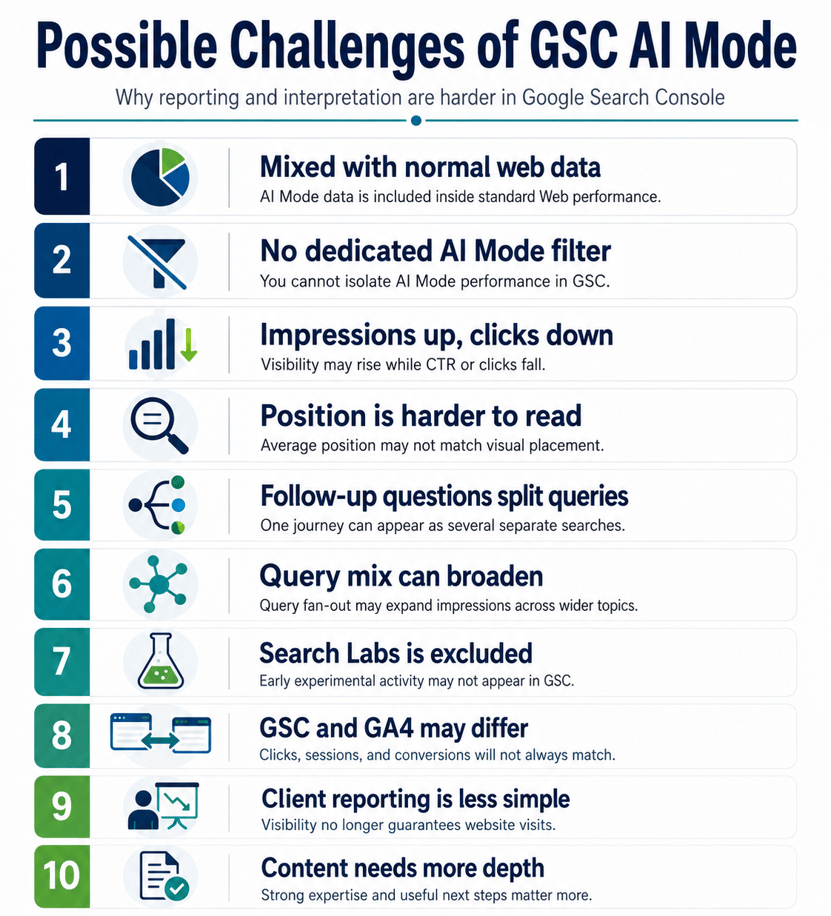
AI Mode is Mixed Into Normal Web Performance
Google reports AI Mode on Search Console and AI Overviews inside the standard Performance report under the “Web” search type. That means you cannot cleanly separate AI Mode clicks, impressions, CTR, or position from classic organic results in GSC.
This makes before-and-after reporting harder. A traffic change may come from classic rankings, AI Overviews, AI Mode, seasonality, or all of them together.
No Dedicated AI Mode Filter
Search Engine Land reported that AI Mode data counts in GSC totals, but Google does not provide a separate filter to isolate AI Mode performance.
This is the biggest reporting gap. You can infer possible AI Mode impact, but you cannot prove it from GSC alone.
Impressions May Rise While Clicks Fall
AI Mode can show your page as a supporting source, which may count as an impression. But a click only counts when the user clicks an external link to your site.
So you may see:
- Impressions up.
- CTR down.
- Clicks flat or down.
This does not always mean SEO performance is failing. It may mean Google is answering more of the query inside the AI experience.
The Average Position Becomes Harder to Explain
Google says AI Mode position follows normal Search position rules, but AI Mode can include link cards, image blocks, and carousels.
This makes the average position less clear. A position number may not reflect the same visual placement users expect from a standard blue-link result.
Follow-up Questions Fragment Query Data
In AI Mode, when a user asks a follow-up question, Google treats it as a new query. The impressions, clicks, and position from that new response are tied to the follow-up query.
This makes the user journey harder to understand. One research session may look like several separate searches in GSC.
Query Fan-out Can Change the Query Mix
Google says AI Mode and AI Overviews may use “query fan-out,” where Google runs multiple related searches across subtopics and sources to build the AI response.
This can cause your pages to appear for broader or more complex queries than before. That may increase impressions, but it can also lower CTR if those users are earlier in the buying journey.
Search Labs Data is Excluded
Google says Search Console does not include data from Search Labs experiments because they are still in active development.
This means early AI testing activity may not appear in GSC. Some market shifts may happen before full reporting becomes visible.
GSC and GA4 May Not Match
GSC measures visibility and clicks from Google. GA4 measures what happens after the visitor lands on your site. Google also recommends using Analytics to track conversions and time spent on site alongside Search Console.
So a click in GSC may not line up perfectly with a GA4 session, lead, or sale.
Client Reporting Can Become Misleading
The old SEO story was simple: better rankings lead to more clicks. AI Mode makes that less reliable.
A better client explanation is:
“AI Mode may increase your visibility in Google, but not every impression will lead to a website visit. We should track search visibility, qualified traffic, engagement, leads, and revenue together.”
Content Strategy Needs More Care
Google says there are no special technical requirements to appear in AI Mode beyond being indexed, eligible for Search, and eligible to show a snippet.
The challenge is that generic content is easier for AI to summarize. Pages need clear expertise, original examples, strong answers, proof points, and useful next steps. That gives users a reason to click through.
What This Means for the Future of SEO
Google's introduction of AI Mode on Google Search Console marks a pivotal shift in how SEO will evolve:
- Search is becoming conversational. Users expect fast, summarized answers.
- Visibility may no longer equal traffic. You might appear in AI answers without the user clicking through.
- Content optimization will require balance. Combine in-depth knowledge with skimmable, AI-friendly formatting.
- AI-focused metrics will become standard. Soon, clients and teams will expect performance reports that include AI-related data.
Staying ahead means learning to write for both users and machines—strategically designing content that's AI-includable but still click-worthy.
The rollout of AI Mode in Google Search Console is a clear signal: AI-powered search isn't just a trend—it's the future. Understanding your performance in this space is no longer optional for digital marketers and SEOs.
By tracking impressions and clicks from AI-generated search results, you can fine-tune your strategy and stay competitive in the evolving SERP landscape.
Need help navigating SEO in the AI era? Our team of digital marketing experts can help you align your content strategy with the latest AI search trends. Book a consultation today and stay ahead of the curve.